


SeaPeople: Boat Tracker
4.863.00 Reviews
App Specs
- Version
- 3.1.2
- Updated On
- License
- Free
- Downloads
- 50,000+
- Developer
- SeaPeople Inc
- Categories
- Travel & Local
- Platform
- Android
Screenshots
 Analysis by AppCompare
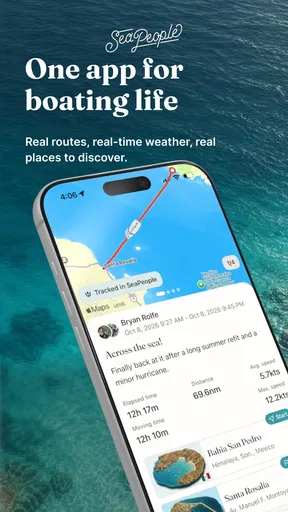
When I head out on the water, the most useful thing a phone can do is make the trip easier to follow—not turn the outing into a screen-watching exercise. SeaPeople: Boat Tracker is built around that practical idea: it uses a boat’s GPS position to help log journeys, plan routes, and share a live location. I see its strongest value in keeping a simple record of where a trip went and letting people on shore follow along, rather than replacing dedicated navigation equipment.
A trip record that helps after you dock
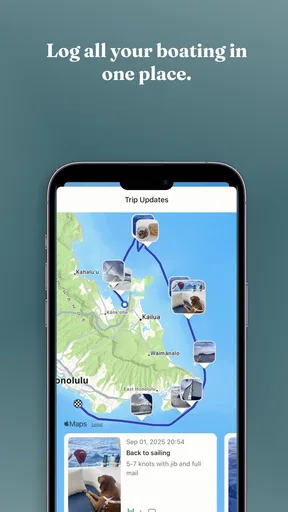
A GPS track is more than a moving dot while you’re underway. Once a route is recorded, it can help you remember which turn led to a quieter anchorage, how you approached a familiar harbor, or where you changed course when the day’s plan shifted. That history is useful precisely because people often forget those details once the boat is tied up.
My practical tip is to treat trip logging as a habit, not something to reconstruct later. If you’re comparing two possible routes for a future outing, a saved track gives you a more dependable reference than memory alone. It can also help a regular crew talk through the day afterward: where you paused, when you turned back, and which stretch you might handle differently next time. That makes the record useful even when you’re not trying to optimize speed or distance.
Live location is most helpful to people waiting ashore
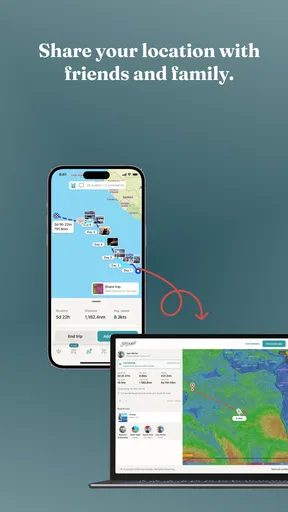
Sharing a live position addresses a different problem from route planning. A partner, friend, or family member can follow the boat’s progress instead of relying on a vague estimate of when you’ll return. For a casual afternoon trip, that can reduce the back-and-forth of messages and make a late change of plan easier to communicate.
I’d agree on expectations before leaving: who will follow the location, what a normal delay looks like, and how you’ll get in touch if plans change. A shared position is a convenience, not a substitute for a check-in plan or proper safety equipment. Anyone relying on it should also remember that a phone-based tracker depends on the phone being usable and able to establish its position; it should not be treated as a guaranteed emergency channel.
Planning a route without making the phone the captain
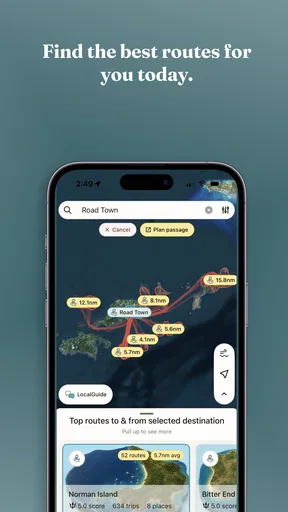
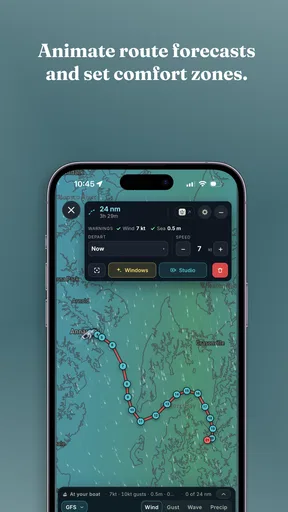
Route planning can make a boating app feel more useful before the engine starts. It gives you a place to think through the intended course and compare it with the trip you actually make. I’d use that preparation to discuss the route with whoever is aboard, especially if they’ll be taking a turn at the helm or need to know where you expect to go.
There’s an important boundary here: a planned line on a screen cannot make a route safe by itself. Conditions, local hazards, visibility, and the boat’s limits still matter, and the person in charge needs to make those judgments. I would keep appropriate charts and established navigation tools available, then use SeaPeople as a companion for tracking and sharing rather than as the only source of guidance.
Worth Reading Before You Choose

Flipboard Shows What News Apps Must Do Beyond the Feed

Switching to Android Auto Means Rethinking Your Driving Routine

Google Calendar Makes a Crowded Week Easier to Manage

Ludo King Makes the Most of the Minutes Between Plans

Baby Panda World Brings Quick Play to Modern Phones, but Its Game Library Feels Busy

ESPN’s Live Game View Makes Following Close Games Easier
Where it fits among boating tools
Compared with using a general map app, a boat-focused tracker is more naturally suited to keeping a record of a voyage and sharing the boat’s progress. A regular map may be familiar for finding places on land, but that doesn’t automatically make it an adequate marine navigation tool. At the other end, dedicated chartplotters and marine navigation systems are the better choice when you need equipment designed specifically for navigation at the helm.
That leaves SeaPeople in a useful middle ground for recreational boaters who want a convenient trip companion on a phone. It may suit a day-sailer, a small-boat owner, or someone who makes familiar local trips and wants a history to look back on. If your priority is dependable, purpose-built navigation in demanding conditions, I would choose proper marine equipment first and regard a phone app as an extra.
The app comes from SeaPeople Inc and sits in the travel-and-local category. It is free to download, with in-app purchases ranging from $6.99 to $489.99 per item, so I’d look at the purchase details before committing to anything beyond the basic download. Its average rating is 4.7 from around 825 ratings, and it has over 10,000 installs. Those figures suggest that other boaters have found a reason to try it, but they don’t tell me whether a particular purchase or workflow will suit your boat.
It is rated for teens, runs on Android 7.0 and later, and version 3.1.0 is the current release. Before relying on it for a planned outing, I’d check that it installs and behaves properly on the phone you intend to bring aboard. A quick test close to shore is more useful than discovering a setup problem when you’re already trying to leave.
For a realistic use case, imagine a family planning a short weekend run to a familiar stretch of water. One person can prepare the route and start tracking, while someone ashore follows the live position and has a better sense of the return time. After docking, the saved trip can help the crew remember where they stopped and decide whether to repeat the outing. The benefit is not that the phone makes the decisions; it gives everyone a shared reference for the journey.
There are trade-offs worth taking seriously. Keeping a phone available for GPS tracking can compete with other uses of the device, and a phone is more vulnerable to water, impact, and battery trouble than equipment made for a helm. I’d secure it, start with a charged device, and avoid making the app responsible for anything essential to safe navigation. If your boating takes you beyond familiar waters or into conditions where a failure would matter greatly, dedicated instruments and sound seamanship should take priority.
Another useful habit is to decide what you want from a trip before setting off. If the goal is simply to keep a location visible to family, focus on making that sharing arrangement clear. If you want a record for your own planning, remember to begin tracking at the start rather than trying to infer the route afterward. Separating those aims avoids expecting one screen to solve every boating problem.
I’d especially recommend giving it a look if you make recurring recreational trips and value a lightweight record of your routes, or if people ashore often ask where you are and when you’ll be back. It is less compelling for someone who only wants a conventional land map, has no interest in trip history or location sharing, or already relies on a marine system that covers these jobs to their satisfaction. The best fit is the boater who wants a phone-based companion, understands its limits, and will use it alongside—not instead of—good navigation practice.
Setting Sail with SeaPeople
First off, getting started with SeaPeople: Boat Tracker is a breeze. You can find it on both Android and iOS platforms, free to download, with some cool in-app purchases if you feel like splurging. Once installed, the setup is pretty straightforward. You’ll be greeted with a tidy interface that’s intuitive and easy to navigate, even if you’re new to boating apps.
The app really shines in its user-friendly design. I mean, who wants to fiddle around with complicated menus when you’re out on the open water, right? The developers clearly had usability in mind, making sure everything is just a tap away. You can track your boat in real-time, which is super handy if you’re exploring unfamiliar waters.
Navigating the High Seas
Now, let’s talk about the features that make SeaPeople stand out. The real-time tracking is obviously a big win, providing accurate GPS data that updates as you move. I took a spin with it on a weekend trip, and it was spot on. Plus, it offers detailed maps, which you can download for offline use – a lifesaver when you’re out of cell range.
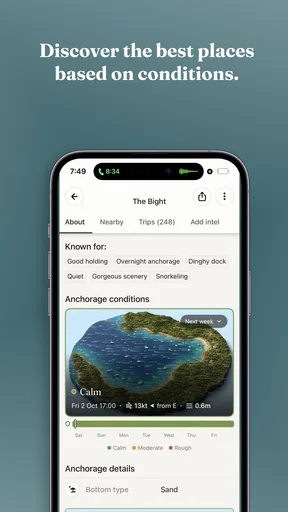
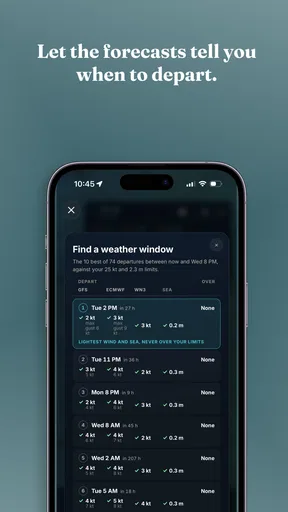
Another neat feature is the weather integration. You’ll get real-time updates about weather conditions, tides, and even wind speeds. It’s like having a meteorologist on board. I found this particularly useful when planning a day out; it saved me from a potential rain-soaked disaster.
Keeping Your Crew Informed
If you’re anything like me, sharing your boating experiences is part of the fun. SeaPeople lets you do just that. You can share your location with friends and family, so they can follow along on your journey or know when to have dinner ready when you dock. It also stores your past trips, which is a great way to relive your adventures or plan future ones.
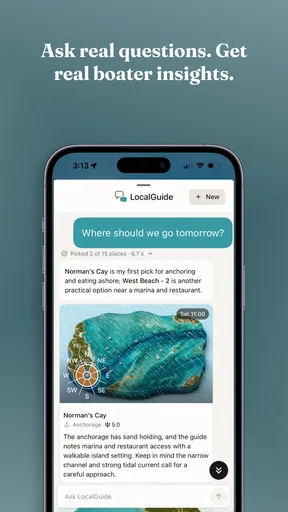
Plus, the app has a social feature where you can connect with other boaters. It’s a tight-knit community where you can exchange tips, share experiences, or just chat about the best fishing spots. I’ve met some pretty interesting folks on there, adding a social element to my boating trips.
Anchoring Down the Details
Let me not forget about the safety features. SeaPeople includes an SOS function that can alert emergency services in case things go south. It’s a comforting feature, especially if you’re venturing far from the shore. Alongside this, the app offers maintenance reminders for your boat, so you never miss a check-up.
The app is regularly updated, which means it’s continually improving. The developers seem to listen to feedback, adding new features and ironing out any kinks. It’s reassuring to know that the app is backed by a team that cares about user experience.
Wrapping Up the Voyage
In conclusion, SeaPeople: Boat Tracker is more than just a navigation tool. It’s a comprehensive companion for any boater, whether you’re a seasoned sailor or a weekend warrior. With its easy setup, real-time tracking, and community features, it’s an app that enhances the boating experience.
If you’re looking to take your maritime adventures to the next level, give SeaPeople a try. It’s a small investment of your time that could lead to a whole sea of possibilities. Download it, set sail, and see where the waves take you!
Pros
- User-friendly interface for easy navigation.
- Accurate real-time boat tracking.
- Comprehensive weather updates included.
- Offline maps for remote areas.
- Customizable alerts for specific regions.
Cons
- Requires constant internet connection.
- Battery consumption is fairly high.
- Limited free version features.
- In-app ads can be intrusive.
- Occasional GPS signal loss.
FAQs for SeaPeople: Boat Tracker
What features does SeaPeople: Boat Tracker offer?
SeaPeople: Boat Tracker provides real-time GPS tracking for boats, allowing users to monitor their vessel's location and speed. The app includes features such as route history, alerts for deviations, and weather updates to ensure safe navigation. Additionally, it offers a community platform to connect with fellow boaters.
Is SeaPeople: Boat Tracker compatible with all mobile devices?
SeaPeople: Boat Tracker is available for both Android and iOS devices. It requires Android 5.0 or later and iOS 11.0 or later. While it supports most smartphones and tablets, users should ensure their device meets these requirements for optimal performance.
Does SeaPeople: Boat Tracker require a subscription?
SeaPeople: Boat Tracker offers both a free version with basic features and a premium subscription that unlocks advanced capabilities such as detailed analytics, extended route history, and priority customer support. Users can choose the plan that best fits their needs and budget.
How accurate is the GPS tracking in SeaPeople: Boat Tracker?
The GPS tracking in SeaPeople: Boat Tracker is highly accurate, utilizing advanced satellite technology to provide precise location data. However, users should be aware that factors such as signal strength, weather conditions, and geographical obstructions can affect accuracy.
Is SeaPeople: Boat Tracker safe and secure to use?
Yes, SeaPeople: Boat Tracker prioritizes user safety and data security. The app employs encryption protocols to protect personal and navigational data. Users can also customize privacy settings and control the visibility of their location to others within the app’s community.


